New 10 Cinematic AI Prompts for Epic Lava Fields with Glowing Cracks
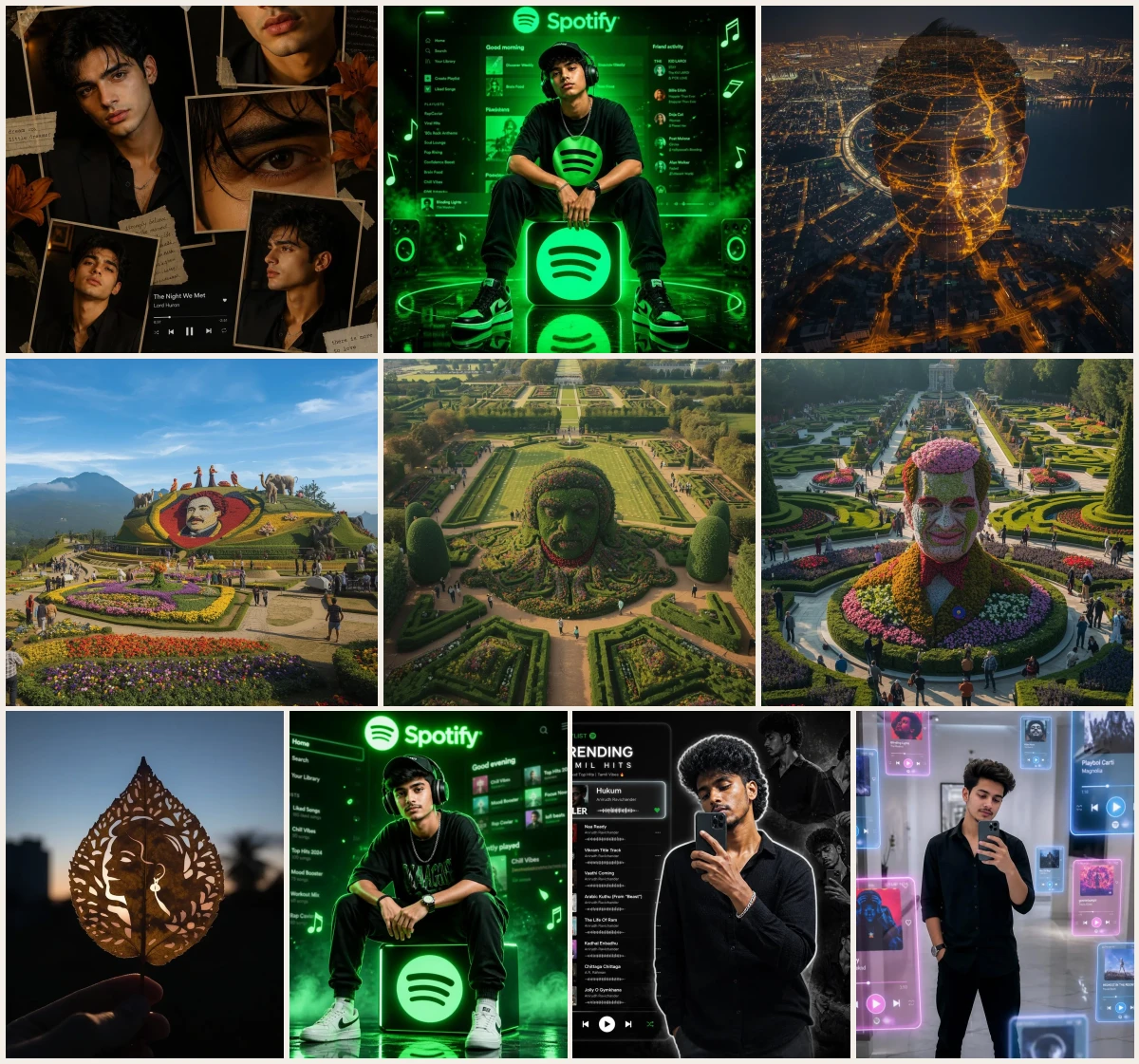
Using cinematic ai prompts allows digital creators, portrait photographers, and visual storytellers to construct striking imagery with accurate subject retention. This collection is crafted for artists who want to convert simple source photographs into dramatic album covers, leaf cut silhouettes, and surreal botanical displays.
What these prompts have in common is a rigorous emphasis on identity control, ensuring features like facial structure, hairstyle, and expressions remain intact. Please remember that all featured pictures are AI-generated examples, so exact lighting and texture rendering can vary when pasted into a different image engine.
Think of this resource as a hands-on quick-start guide loaded with expert creative tips. You will discover how to prompt everything from a neon spotify aesthetic to an epic mirror selfie frame with confidence.
Table of contents
- A comprehensive style and tool guide for transforming reference photos into cinematic AI artwork.
- 10 Cinematic Epic Lava Fields Glowing Cracks Prompts
- Masculine Cinematic Collage: The Moody Urban Explorer's Journal
- Cinematic Neon Spotify Icon: Music Superstar Portrait
- A City's Glow: Aerial Nightscape Portrait Fusion
- Ooty Inspired: A Hillside Floral Portrait Masterpiece
- A Majestic Garden's Grand Floral Bush Portrait Display
- A Garden Masterpiece: Floral Topiary Exhibition Portrait
- A Handcrafted Leaf-Cut Portrait: Silhouette Against Blue Hour
- Cinematic Neon Spotify-Themed Portrait of a Music Icon
- Stylish Instagram Reel Poster with Black & White Collage and Tamil Music
- Realistic Futuristic Mirror Selfie with Floating Hologram Music
- Why these cinematic ai prompts work
- Choosing the right base photo for cinematic prompts
- Lighting, colour and camera words that matter
- Step-by-step workflow from photo to final image
- Customising the prompts for your own style
- How to use these prompts
- Pro tips for better results
- Common mistakes to avoid
- Frequently asked questions
- Final thoughts
| Prompt | Look | Best for | Tool |
|---|---|---|---|
| Masculine Cinematic Collage: The Moody Urban Explorer's Journal | Moody urban photo collage with realistic outfit retention | Personal branding portfolio | Midjourney |
| Cinematic Neon Spotify Icon: Music Superstar Portrait | Glowing neon icon portrait with energetic lighting | Music cover art | Flux |
| A City's Glow: Aerial Nightscape Portrait Fusion | Aerial night view merged with detailed facial lighting | Social media header | Midjourney |
| Ooty Inspired: A Hillside Floral Portrait Masterpiece | Lush hillside garden backdrop with sharp face preservation | Botanical event invite | Leonardo AI |
| A Majestic Garden's Grand Floral Bush Portrait Display | Grand botanical bush display framing a central portrait | Art exhibition poster | ChatGPT |
| A Garden Masterpiece: Floral Topiary Exhibition Portrait | Meticulous topiary floral wall framing subject likeness | Gallery display banner | Gemini |
| A Handcrafted Leaf-Cut Portrait: Silhouette Against Blue Hour | Delicate leaf-cut paper cutout silhouette during blue hour | Artistic avatar photo | Midjourney |
| Cinematic Neon Spotify-Themed Portrait of a Music Icon | Futuristic neon music poster with glowing icon elements | Streaming platform banner | Flux |
| Stylish Instagram Reel Poster with Black & White Collage and Tamil Music | Stylish black and white mirror selfie collage layout | Instagram reel cover | Leonardo AI |
| Realistic Futuristic Mirror Selfie with Floating Hologram Music | Cinematic mirror selfie with floating holographic UI elements | Sci-fi story post | Flux |
Example images on this page are AI-generated. The same prompt can look different in another tool or model version.
10 Cinematic Epic Lava Fields Glowing Cracks Prompts

Prompt 1 of 10
Masculine Cinematic Collage: The Moody Urban Explorer's Journal
This image renders a dark vintage scrapbook collage featuring four to five angled, overlapping photo frames taped against a moody background. The visual style relies on gritty urban portraiture with close-up and medium shots emphasizing consistent attire and identity. Choosing the term vintage scrapbook layout dramatically alters the frame composition compared to a modern digital grid.
Create a stylish cinematic masculine photo collage using an uploaded image as the face reference and keep the original dress/outfit exactly the same. Preserve clothing, colors, fabric, accessories, hairstyle, and overall identity. Design a vintage scrapbook collage layout with 4–5 overlapping photo frames placed at different angles, like printed photos taped on a dark background. Use multiple close-up and portrait shots of the subject with confident expressions. Include: Main large portrait looking at camera with moody expression. Close-up crop of lips/jawline. Dramatic close-up of one eye. Smaller portrait with slight head tilt. Optional side-angle portrait. Add warm orange lily flowers around the collage edges, torn paper textures, masking tape corners, subtle handwritten paper elements, and a transparent retro music player overlay in one section. Use dark moody indoor lighting, golden highlights on face, cinematic shadows, rich contrast, soft skin texture, premium editorial vibe. Background should be black/dark brown with luxury aesthetic tones. Keep the face realistic and highly detailed. Ultra realistic, sharp focus, DSLR portrait quality, trendy Instagram reel collage, 4k quality.

Prompt 2 of 10
Cinematic Neon Spotify Icon: Music Superstar Portrait
The portrait captures a confident music artist sitting casually on a vibrant, glowing Spotify logo stool in a dark studio space. The visual style balances rich street fashion, such as oversized streetwear and sneakers, with sharp neon lighting reflections. Using the phrase oversized streetwear t-shirt shifts the silhouette from a sleek suit to an edgy urban music icon look.
Create a cinematic neon Spotify-themed portrait using an uploaded photo as the main subject. Keep the exact face, hairstyle, skin tone, and identity. Transform the subject into a stylish music icon sitting confidently on a glowing Spotify logo cube/stool in the center. Pose the subject sitting casually with elbows resting on knees, looking directly at camera with attitude and calm expression. Dress in oversized streetwear t-shirt, joggers, sneakers, cap, and headphones around ears. Scene should be fully lit in vibrant Spotify green neon light with fog, smoke, glowing particles, floating music notes, and soft bokeh effects. Background should feature a futuristic blurred Spotify app interface with playlists and UI elements glowing behind. Add the word Spotify at top in soft neon text. Floor should be glossy with reflections of the glowing logo. Add dramatic rim lighting around the body for depth. Keep the face sharp and realistic. Style: ultra realistic, premium poster design, cinematic lighting, high contrast, moody music studio vibe, viral Instagram reel aesthetic. Aspect ratio: 9:16 vertical. Quality: 4K ultra detail. Mood: powerful, trendy, music lover, superstar vibe.

Prompt 3 of 10
A City's Glow: Aerial Nightscape Portrait Fusion
This creative visual seamlessly renders a person's upper body and face formed entirely out of glowing city lights from a high-altitude drone perspective. The style combines architectural aerial night photography with abstract human identity portraiture. Specifying warm golden city lights creates a fiery, energetic glow rather than a cool cyberpunk blue palette.
Preserve 100% exact facial identity of a specific individual (no changes to face, skin tone, hairstyle, or expression). Create a cinematic aerial night cityscape portrait where the subject is seamlessly blended into a high-altitude drone view of a sprawling, glowing city at night. The entire portrait, encompassing the face and upper body, should be formed using thousands of warm golden city lights, intricate street networks, and the dynamic patterns of moving traffic, creating a mesmerizing double-exposure effect where the subject emerges naturally from the illuminated urban grid. Incorporate a large, dark, reflective lake or water body in the background to provide a sense of depth and contrast. Utilize a rich golden-orange and deep blue color contrast to evoke a dramatic night atmosphere, enhanced by a soft haze and an atmospheric glow that permeates the scene. Ensure realistic light mapping so that the individual city lights precisely define the facial contours, subtly highlight hair texture, and suggest the soft folds of clothing, adding to the realism. The style should be ultra-realistic, cinematic, capturing the essence of long-exposure city lights, featuring HDR, incredibly high detail, 8K quality, a dreamy yet remarkably sharp aesthetic, and smooth blending without any distortion of the preserved facial features.

Prompt 4 of 10
Ooty Inspired: A Hillside Floral Portrait Masterpiece
The scene shows a sprawling botanical garden centered around a massive hill-shaped floral installation depicting a detailed facial portrait. Its style mimics realistic landscape architecture adorned with thousands of vibrant petals and ornamental greenery. Replacing fresh flowers with dried autumn leaves completely changes the vibrant festival mood to a moody seasonal installation.
Preserve the identity and likeness of a specific individual with high accuracy. Create a breathtaking long-shot view of an Ooty Flower Show-inspired botanical garden. The main attraction is a beautifully sculpted, hill-shaped floral centerpiece featuring a giant portrait of the person, meticulously crafted from thousands of vibrant, colorful fresh flowers, delicate petals, ornamental plants, and lush greenery. The individual flowers should be clearly visible and distinct, forming the facial features with precision and artistry, not just a blurred floral mass. Surrounding this grand centerpiece are matching floral sculptures of peacocks, majestic elephants, elegant swans, and various decorative topiary artworks, all crafted in the same exquisite style and harmonious color palette. Capture the entire expansive garden from a distant 24mm wide-angle perspective, showcasing vibrant flower beds, gracefully curved pathways, cascading garden tiers, numerous visitors admiring the spectacle, and picturesque scenic landscaping. Include the characteristic misty Nilgiri hills in the background, bathed in soft golden morning light, beneath a crystal-clear blue sky. Emphasize colorful flower carpets, cinematic depth, incredibly realistic horticultural craftsmanship, HDR photography, ultra-detailed flower textures, hyper-realistic botanical artistry, travel-magazine quality, a photorealistic masterpiece of majestic scale, with an aspect ratio of 9:16.

Prompt 5 of 10
A Majestic Garden's Grand Floral Bush Portrait Display
This artwork highlights a massive, manicured topiary bush sculpted precisely into a human portrait within a majestic botanical garden. The visual aesthetic fuses clean eco-sculpture design with layered, colorful blooming plants. Including the phrase perfectly trimmed green bush topiary ensures crisp structural edges instead of an overgrown wild bush appearance.
Preserve the identity and likeness of a specific individual with high accuracy. Create a breathtaking botanical garden scene where the person’s portrait is grandly sculpted directly onto a massive, perfectly trimmed green bush topiary. This giant bush serves as the central, awe-inspiring attraction, with the portrait formed using layers of vibrant, colorful fresh flowers, flourishing flowering plants, and dense greenery, making the intricate floral craftsmanship clearly visible and recognizable from a considerable distance. Surrounding this magnificent centerpiece are beautifully maintained flower beds, bursting with a spectrum of colors, elegant ornamental shrubs, gracefully curved garden pathways, artfully shaped decorative hedges, and additional matching floral sculptures that subtly complement the main portrait. The bush should appear naturally integrated into the expansive landscape while unequivocally standing out as a spectacular horticultural masterpiece. Capture the entire scene from a long-distance 24mm wide-angle perspective, comprehensively showcasing the entire garden, numerous visitors admiring the display, sprawling rolling green lawns, soft golden sunlight bathing the scene, vibrant flowers everywhere, incredibly realistic plant textures, profound cinematic depth, and HDR photography. The quality should be akin to a travel-magazine feature, demonstrating hyper-realistic horticultural artistry, a photorealistic masterpiece, with an aspect ratio of 9:16. The individual flowers should be distinctively visible, forming the features of the face, not just a blurry floral mass.

Prompt 6 of 10
A Garden Masterpiece: Floral Topiary Exhibition Portrait
This exhibition portrait depicts a medium-sized floral centerpiece displaying a recognizable facial sculpt built from dense foliage and fresh flowers. Its visual style mimics high-end flower festival competitions with clear lighting and detailed petal textures. Specifying medium-sized floral topiary creates an intimate exhibition stand rather than a sweeping, distant landscape piece.
Preserve the identity and likeness of a specific individual with high accuracy. Create a beautiful botanical garden display where the person’s portrait is meticulously crafted on a medium-sized floral topiary centerpiece, approximately the size of a prominent flower festival exhibition display. The portrait should be clearly recognizable, formed from thousands of fresh, vibrant flowers, colorful petals, lush flowering plants, and verdant greenery, with individual flowers and distinct floral textures visibly forming the intricate facial features and contours. The display is strategically positioned in the serene center of a meticulously maintained garden, surrounded by vibrant flower beds bursting with color, elegantly trimmed decorative hedges, ornamental shrubs, other sophisticated topiary designs, and gracefully curved walking paths. Visitors are gathered around the display, admiring and photographing the exquisite floral artwork, creating the bustling yet pleasant atmosphere of a popular, high-profile flower show. Capture the scene from a comfortable viewing distance that clearly showcases both the detailed floral portrait and its stunning surrounding garden environment. Illuminate the scene with soft, warm golden sunlight, highlighting the colorful seasonal flowers and realistic plant textures. Include natural, gentle shadows and cinematic depth. The photography style should be HDR, exuding travel-magazine quality, a professional DSLR shot, photorealistic, and display elegant, refined horticultural craftsmanship. The aspect ratio should be 9:16. The floral portrait should be the undeniable main attraction, while remaining realistic, tasteful, and perfectly proportionate to the garden environment—it should not appear gigantic, but rather a beautifully showcased, premium flower festival centerpiece where the flowers clearly define the facial features.

Prompt 7 of 10
A Handcrafted Leaf-Cut Portrait: Silhouette Against Blue Hour
A delicate dried peepal leaf features an intricate silhouette portrait carved directly into its veins using fine negative space techniques. The visual style is rooted in macro organic craft photography set against a serene blue hour sky. Using peepal leaf provides delicate, web-like vein textures that differ completely from a solid oak leaf design.
Preserve the exact facial reference of a specific individual, including facial structure, hairstyle, smile, eyes, earrings, expression, and overall identity with high accuracy. Create an ultra-realistic handcrafted leaf-cut portrait artwork. A naturally dried peepal leaf is artistically cut into an intricate silhouette portrait design, with the person’s face and flowing hair meticulously carved into the leaf using a detailed stencil-style negative space art technique. The delicate leaf is gently held by a human hand, showcasing its fragility and the intricate artwork, in front of a soft evening sky during the enchanting blue hour sunset. The background contains subtly blurred city buildings, distant trees, and palm silhouettes, creating a dramatic yet soft contrast with cinematic depth of field. The leaf itself should exhibit realistic organic texture, clearly visible veins, and delicate, handcrafted cut patterns around its edges, showcasing fine artisan detailing. The composition should be minimal aesthetic, with realistic soft shadows cast by the hand and leaf. Use soft natural ambient lighting that highlights the leaf's translucent qualities. Employ shallow depth of field, a DSLR photography style, an ultra-detailed handmade craft look, and a premium Instagram reel aesthetic. Focus on realistic hand positioning, a smooth bokeh background, high realism, and 4K quality.
Prompt 8 of 10
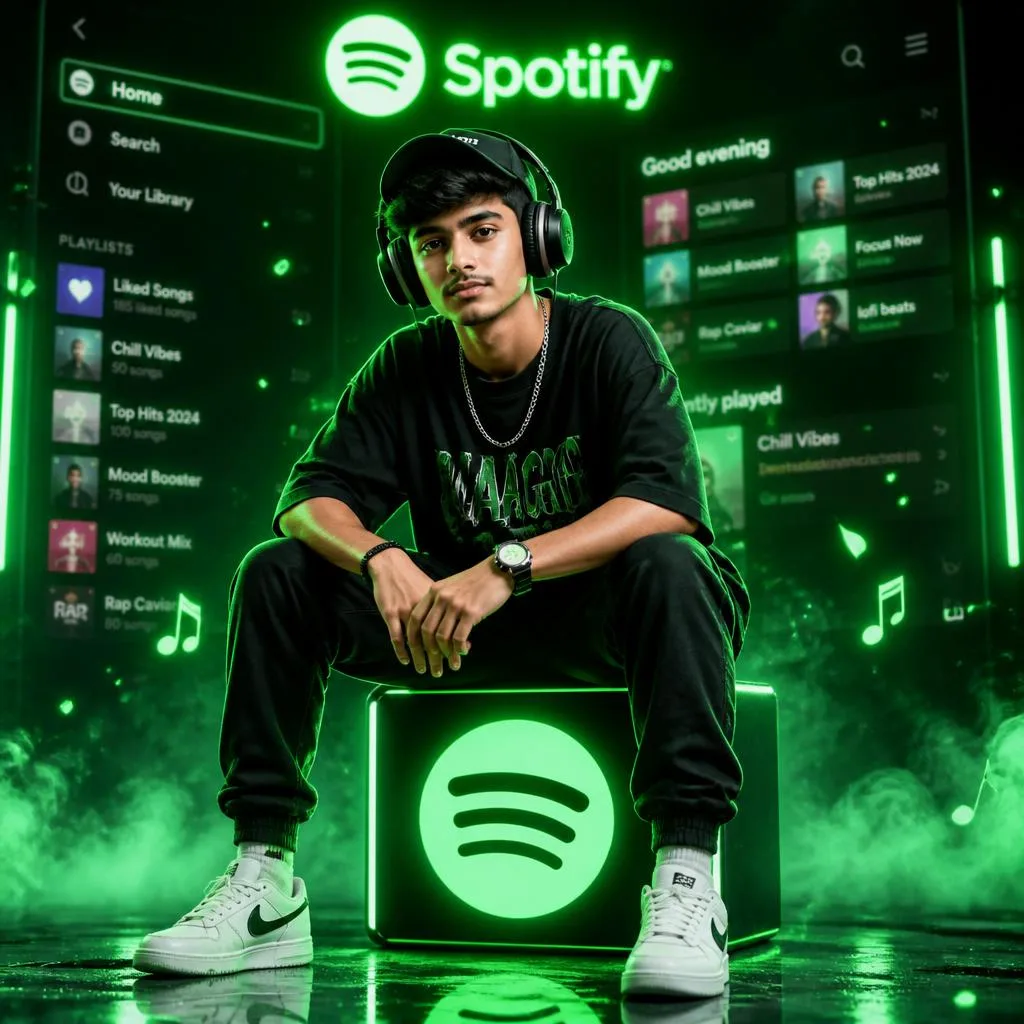
Cinematic Neon Spotify-Themed Portrait of a Music Icon
The artwork depicts a sleek artist profile surrounded by ambient neon glow while perched directly on an illuminated Spotify cube. Its style blends high-fashion streetwear portraiture with vibrant contrast lighting and headphones. Adding neon blue and pink edges introduces a cybernetic vibe compared to monochrome studio lighting setups.
Create a cinematic neon Spotify-themed portrait using my uploaded photo as the main subject. Keep my exact face, hairstyle, skin tone, and identity. Transform me into a stylish music icon sitting confidently on a glowing Spotify logo cube/stool in the center. Pose me sitting casually with elbows resting on knees, looking directly at camera with attitude and calm expression. Dress me in oversized streetwear t-shirt, joggers, sneakers, cap, and headphones around ears. Scene should be fully lit in vibrant Spotify green neon light with fog, smoke, glowing particles, floating music notes, and soft bokeh effects. Background should feature a futuristic blurred Spotify app interface with playlists and UI elements glowing behind me. Add the word Spotify at top in soft neon text. Floor should be glossy with reflections of the glowing logo. Add dramatic rim lighting around my body for depth. Keep my face sharp and realistic. Style: ultra realistic, premium poster design, cinematic lighting, high contrast, moody music studio vibe, viral Instagram reel aesthetic. Aspect ratio: 9:16 vertical. Quality: 4K ultra detail. Mood: powerful, trendy, music lover, superstar vibe. Ensure face identity is 100% accurate to reference.

Prompt 9 of 10
Stylish Instagram Reel Poster with Black & White Collage and Tamil Music
A striking social media composition features a central mirror selfie with a bold white cutout glow set against a dark monochrome collage. The aesthetic merges contemporary phone selfie culture with graphic design elements like translucent music overlay cards. Mentioning bold white glow outline cutout separates the foreground subject sharply from background collage elements.
Create a stylish Instagram reel poster using my uploaded photo as the main subject. Keep my exact face, hairstyle, body shape, and pose. Show me taking a mirror selfie with my phone, centered in the frame. Add a bold white glow outline cutout effect around my body to make me stand out. Background should be dark black with a cinematic collage of faded black-and-white photos of me placed behind in different positions. On the left side, add a transparent Spotify-style playlist panel with glowing UI showing trending Tamil hit songs. Include realistic album covers, song titles, artist names, waveform bars, and playlist text. Make one highlighted song tile larger and brighter. Use songs inspired by popular Tamil hits like Jailer, Leo, Vikram, Master, Beast, Love Today, Don, Thunivu, Ponniyin Selvan with stylish Tamil music vibe. Keep the design modern, clean, moody, and viral trend style. Lighting should focus on me with sharp clarity while background stays slightly blurred. Style: ultra realistic, high contrast, cinematic, trendy Gen Z edit, premium social media aesthetic. Aspect ratio: 9:16 vertical. Quality: 4K high detail. Mood: dark stylish Tamil Spotify vibe poster. Ensure face identity is 100% accurate to reference.

Prompt 10 of 10
Realistic Futuristic Mirror Selfie with Floating Hologram Music
A clean indoor room acts as the setting for a modern mirror selfie surrounded by floating 3D holographic music interface tiles. The visual style presents a soft futuristic ambiance with subtle neon accent hues illuminating the scene. Specifying floating transparent 3D music player tiles creates volumetric spatial depth around the subject rather than flat screen overlays.
Create a realistic cinematic mirror selfie scene using my uploaded photo as the main subject. Keep my exact face, hairstyle, body shape, and outfit. Show me standing in a modern white indoor room with soft lighting, taking a mirror selfie with a phone in hand. Around me, add multiple floating transparent 3D music player tiles/cards in different sizes, glowing softly with neon blue and pink edges. The cards should surround me in depth, some close to camera, some behind me, creating a futuristic hologram playlist effect. Each tile should display album art, play buttons, progress bars, song titles, and music UI controls. Arrange them naturally around my body like they are floating in air. Add slight blur on foreground and background cards for depth of field. Style should be ultra realistic, clean aesthetic, modern Instagram reel vibe, cinematic lighting, glossy reflections on floor, minimal white luxury room background. Keep me centered and sharp focus. Aspect ratio: 9:16 vertical. Quality: 4K high detail. Mood: futuristic, stylish, social media viral trend. Ensure face identity is 100% accurate to reference.
Why these cinematic ai prompts work
This structural approach helps digital artists, social media marketers, and portrait photographers who need strict subject consistency across varied virtual settings. Standard generation often changes facial features, but these tailored instructions force the system to lock core geometry while building dramatic environmental elements around your subject.
Prompts using an urban explorer concept with moody street lighting guide the generator to render detailed fabric textures, leather jackets, and atmospheric background haze. This precise descriptive wording directs the lighting engine to cast focused rim light on the subject without altering key facial proportions or skin tones.
When setting up your rendering parameters, select a vertical 4:5 aspect ratio to maximise detail for mobile displays, and keep the face preservation instructions unaltered during editing passes. Leveraging structured cinematic ai prompts guarantees reliable output across multiple project variations.
Choosing the right base photo for cinematic prompts
This selection process helps photo editors, branding specialists, and visual designers who rely on source photo inputs to guide detailed diffusion models. Selecting the correct input photo determines whether the AI can successfully parse key identity points like eye placement, mouth shape, and underlying cheekbone structure.
Uploading a clear source image intended for a botanical garden layout ensures that the model correctly separates the subject from surrounding floral elements. Bright, even lighting in your base upload allows the generator to map complex topiary arrangements and vibrant petals around the subject without bleeding colour onto skin surfaces.
Select a well-lit, uncompressed neutral headshot with minimal motion blur, and strictly avoid applying digital filters, heavy grain, or dramatic color grading to the input photo prior to initial generation. Taking these extra foundational steps ensures your cinematic ai prompts yield clean results every single time.
Lighting, colour and camera words that matter
This detailed breakdown helps digital painters, lighting artists, and visual concept designers who want to control mood, depth, and atmospheric balance without frustrating trial and error. Crafting strong visual contrast requires specific camera and lighting terms that explicitly direct how artificial light sources illuminate the subject.
Incorporating background descriptions such as a night cityscape with glowing ambient light guides the image engine to render realistic light falloff across skin textures, clothing fabrics, and background architecture. This specific descriptive direction encourages the model to generate deep dark shadows while establishing vibrant, neon-tinted highlights across urban surroundings.
Frame your render using a 16:9 panoramic aspect ratio to give dark atmospheric backgrounds adequate spatial room to expand into subtle neon reflections without compressing your primary subject. Maintaining precise camera descriptors ensures your cinematic ai prompts consistently produce polished, high-contrast visual compositions.
Step-by-step workflow from photo to final image
This structured step-by-step routine helps content creators, social media producers, and digital retouchers who require a dependable, repeatable workflow for producing high-end digital portraits. Following a clear sequence prevents unexpected identity shifts and ensures detailed background elements integrate seamlessly with your uploaded reference photo.
Combining a delicate leaf cut silhouette concept with soft blue hour background lighting prompts the diffusion model to isolate subject outlines into intricate, paper-craft structures. The generator balances fine organic cuts against a smooth twilight sky, producing high contrast along delicate edges while keeping facial proportions recognizable.
Generate your initial base render at standard resolution to evaluate composition, then apply subtle manual post-processing edits to fine-tune color saturation instead of re-running the entire text prompt. Utilizing structured cinematic ai prompts makes this step-by-step process both efficient and predictable for creative production.
Customising the prompts for your own style
This creative customization advice helps agency directors, branding designers, and independent content creators who want to adapt established prompt frameworks to match distinct brand aesthetics. Learning how to isolate and swap specific visual descriptors allows you to generate endless artistic variations while preserving consistent character likenesses.
Replacing default backdrop parameters with a vibrant neon spotify layout featuring floating glowing music iconography transforms a simple portrait into an energetic promotional poster. Modifying these background prop descriptors alters ambient lighting patterns and rich neon color accents without altering the subject's original clothing details or facial structure.
Keep your core pose directions straightforward when changing environmental elements, and adjust only one prop or color modifier per generation pass to evaluate its precise impact on final output. Experimenting systematically with these cinematic ai prompts empowers you to build a unique visual style tailored to your audience.
🛠 How to use these prompts
- Select a clear, high-resolution reference photo showing key facial details, hairstyle, and skin tone for identity preservation.
- Choose your target prompt style, such as the neon Spotify cube stool or the carved peepal leaf silhouette.
- Input exact phrases describing clothing or structural materials, like oversized streetwear or manicured topiary bushes, to lock the subject context.
- Adjust lighting parameters in the prompt, such as blue hour lighting or glowing neon edges, to set the atmosphere.
- Render the image generation and refine specific visual details like white cutout glow outlines or foliage density.
- Export your final render and crop it for social media layouts like Instagram Reel posters or music artwork.
💡 Pro tips for better results
- Using the phrase peepal leaf guarantees web-like vein textures that make fine negative-space leaf silhouettes look authentic.
- Specify bold white glow outline cutout to create an instant pop-art effect that separates mirror selfie subjects from background collages.
- Include floating transparent 3D music player tiles to generate volumetric depth and glowing reflections across indoor surfaces.
- Explicitly state perfectly trimmed green bush topiary so the generator builds structured facial shapes rather than untamed greenery.
- Describe physical props like glowing Spotify logo cube/stool to give sitting subjects a clear, context-defining anchor.
- Write thousands of warm golden city lights to force the AI model to render intricate aerial street networks.
Common mistakes to avoid
- Omitting explicit facial identity preservation instructions when providing a reference photo. Include detailed identity clauses at the start of your prompt specifying face, hairstyle, skin tone, and accessories.
- Overcrowding floral topiary prompts with too many non-botanical elements, confusing the subject shape. Focus the prompt directly on the central topiary centerpiece, defining distinct flower species and trimmed bush layers.
- Leaving out spatial depth cues when prompting floating holographic elements in mirror selfies. Use depth-focused phrases like surround me in depth, some close to camera to build true 3D spatial separation.
❓ Frequently asked questions
How do cinematic ai prompts help maintain face identity when using reference photos?
Cinematic ai prompts use precise identity preservation clauses that instruct image models to lock facial geometry, hair texture, skin tone, and accessories. By combining uploaded reference photos with clear descriptive constraints, the AI renders your exact likeness inside complex lighting setups, such as neon Spotify studios or floral topiaries. This guarantees artistic, cinematic ai prompts produce consistent portraits without distorting your original appearance across different artistic styles.
Which AI generator works best for creating detailed floral topiary and leaf-cut portraits?
Tools like Midjourney and Flux excel at rendering organic textures like fresh flower petals, leaf veins, and intricate topiary bushes. Their advanced text understanding captures subtle details like negative space stencils or carved greenery displays accurately. However, remember that results vary by tool and model version, so tweaking lighting prompts or upscaling settings can help achieve the exact botanical detail you want.
Can I adapt these image prompts for social video formats like Instagram Reels or TikTok?
Yes, these cinematic ai prompts are tailored for social media creation, especially composition styles featuring mirror selfies, poster cutouts, and floating holographic UI cards. You can render static base images and import them into video editing software to add animated text, music overlays, or smooth zoom effects. Adjusting the aspect ratio parameters like 9:16 ensures your rendered poster fits full-screen mobile layouts perfectly.
What is the benefit of adding dark background collages to mirror selfie prompts?
Adding dark background collages creates a high-contrast visual hierarchy that elevates a standard mirror selfie into a stylized album poster. By specifying faded black-and-white photos behind a glowing cutout outline, you draw immediate focal attention to the foreground subject. This design technique mimics professional graphic design cover art, giving your personal photos a polished, edgy, and cinematic aesthetic.
How do I ensure neon lights reflect realistically on clothing and surrounding props?
To achieve realistic neon lighting reflections, explicitly describe the light sources and nearby materials in your prompt. Words like glowing neon edges, streetwear joggers, or illuminated cube guide the generator to cast soft color spills across clothing fabric and floor surfaces. Specifying color pairs like blue and pink further enhances dynamic range and contrast throughout the generated scene.
Final thoughts
Start with the third prompt featuring the aerial nightscape fusion to immediately experience how complex background lighting elevates personal portraits. This composition creates an eye-catching contrast that highlights facial preservation capabilities. Remember that all shown images are AI-generated examples, meaning the same text inputs can yield varying color tones and detail levels when executed in different rendering software. Experimenting with these cinematic ai prompts provides a practical path toward mastering consistent, studio-quality digital art creation.
Related hashtags
Keep exploring